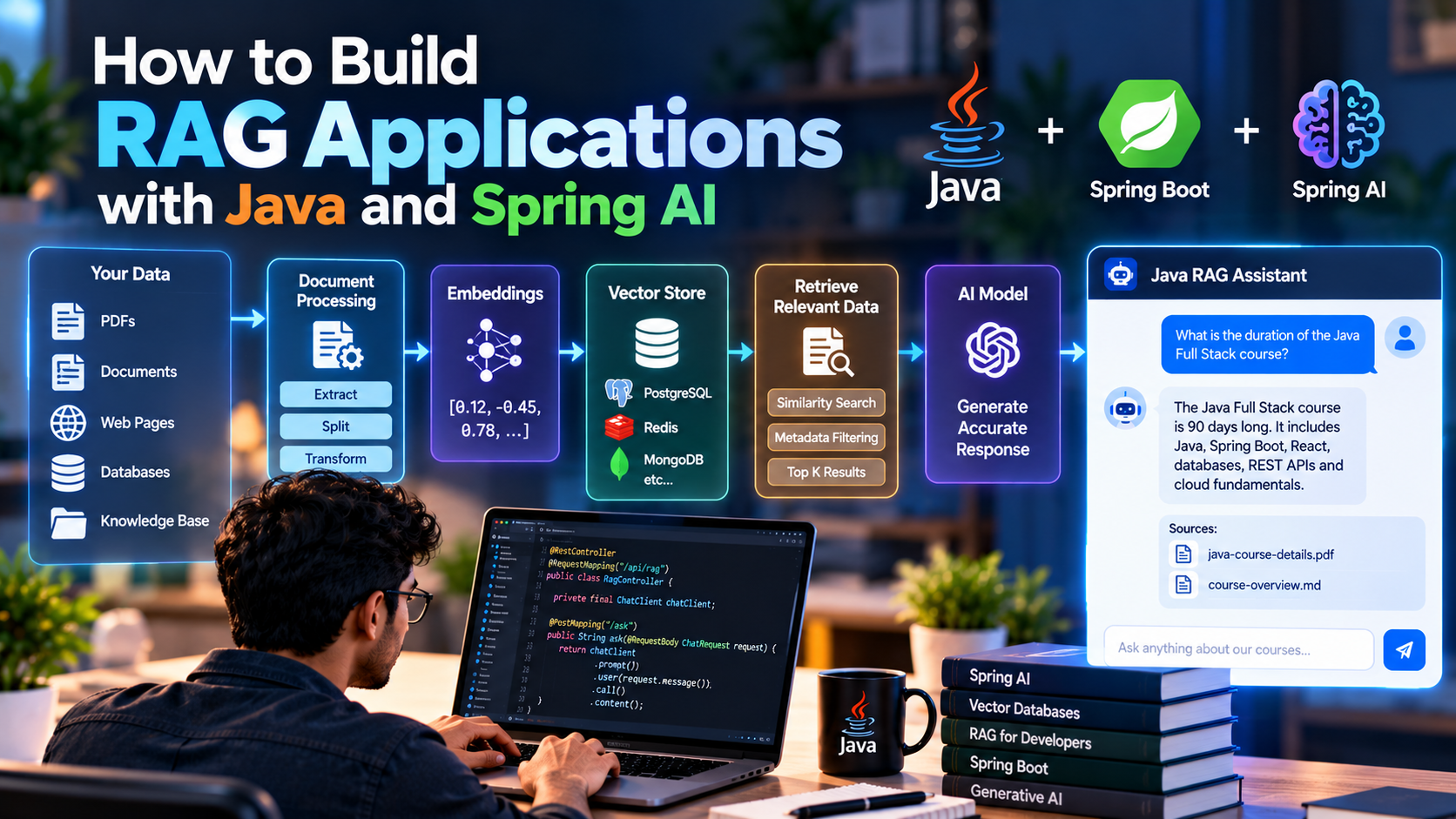
How to Build RAG Applications with Java and Spring AI
Large Language Models are powerful, but they don't automatically know your application's private or constantly changing data.
For example, an AI model may know what Java or Spring Boot is, but it won't automatically know:
- Your company's internal documentation
- Course details
- Product information
- Customer support documents
- Internal policies
- PDFs and knowledge bases
- Application-specific data
Retrieval-Augmented Generation (RAG) solves this problem by retrieving relevant information from your own data and providing it to the AI model as context before generating a response.
With Java, Spring Boot, and Spring AI, developers can build RAG applications using familiar Spring APIs and vector-store abstractions. Spring AI currently provides RAG advisors, vector-store APIs, document ingestion pipelines, and support for multiple AI providers and vector databases.
In this guide, we'll understand how RAG works and build a basic RAG application using Java and Spring AI.
What Is RAG?
RAG stands for Retrieval-Augmented Generation.
Instead of asking an AI model to answer a question using only its trained knowledge, a RAG application first searches a knowledge base for relevant information.
The basic flow is:
User Question
↓
Create Query Embedding
↓
Search Vector Database
↓
Retrieve Relevant Documents
↓
Add Documents as Context
↓
AI Model
↓
Generated Answer
For example:
User:
What is the duration of our Java Full Stack course?
The application can search the organization's course documents, retrieve the relevant content, and then provide that information to the AI model.
The model can then generate an answer based on the retrieved context.
Spring AI describes this approach as retrieving similar document pieces and including them with the user's question when constructing the prompt sent to the AI model.
Why Do We Need RAG?
A traditional chatbot might look like this:
User
↓
AI Model
↓
Response
The problem is that the model may not have access to your private data.
A RAG application changes the architecture:
User
↓
Search Knowledge Base
↓
Relevant Information
↓
AI Model
↓
Response
This allows applications to answer questions using information that exists outside the model's original training data.
Common RAG use cases include:
- Customer-support assistants
- Enterprise knowledge assistants
- Documentation chatbots
- HR assistants
- Educational assistants
- Product-support systems
- Legal-document search
- Financial-document analysis
- Internal company search
- Course and training assistants
How a RAG Application Works
A typical RAG system has two major pipelines.
1. Data Ingestion Pipeline
First, your documents need to be converted into searchable data.
PDF / Website / Database / Documents
↓
Extract
↓
Split
↓
Generate
Embeddings
↓
Vector Database
2. Query Pipeline
When a user asks a question:
User Question
↓
Create Embedding
↓
Vector Similarity Search
↓
Relevant Documents
↓
Prompt + Context
↓
AI Model
↓
Answer
Spring AI provides an ETL framework for extracting documents, transforming them and writing them to a vector store. Its Document abstraction can contain text, metadata and additional media information.
What Is a Vector Database?
A vector database stores information in a form that makes similarity search possible.
Instead of searching only for exact words, the application can search for content that is semantically similar to the user's question.
For example:
Document:
"Students can access recorded classes from their dashboard."
User:
"Where can I watch previous classes?"
The words aren't identical, but their meaning is related.
A vector search can identify this relationship.
Spring AI provides a common VectorStore abstraction so applications can work with supported vector databases without tightly coupling application code to a particular implementation.
Popular Vector Store Options
Depending on your architecture, you can use different vector-storage technologies, including:
- PostgreSQL with pgvector
- Redis
- MongoDB
- Elasticsearch
- Pinecone
- Amazon Bedrock Knowledge Bases
- Other Spring AI-supported vector stores
The appropriate choice depends on factors such as your existing database infrastructure, scale, deployment model and search requirements.
Spring AI provides a portable Vector Store API and supports multiple vector-database implementations.
Building a RAG Application with Java and Spring AI
Let's look at a simplified implementation.
Our application will contain:
Spring Boot
↓
Spring AI
↓
Embedding Model
↓
Vector Store
↓
Chat Model
We'll assume that our documents have already been loaded into a vector store.
Step 1: Create a Spring Boot Application
Create a Spring Boot application using Maven.
Typical components include:
Spring Web
Spring AI
Vector Store integration
AI model integration
For the AI model, you can use a supported provider such as OpenAI or another Spring AI integration.
Spring AI provides model APIs across multiple providers, including OpenAI, Microsoft, Amazon and Google.
Step 2: Add Spring AI Dependencies
For example, an OpenAI chat model can be added using:
<dependency>
<groupId>org.springframework.ai</groupId>
<artifactId>spring-ai-starter-model-openai</artifactId>
</dependency>
For RAG using Spring AI's QuestionAnswerAdvisor, the current documentation also provides the vector-store advisor dependency:
<dependency>
<groupId>org.springframework.ai</groupId>
<artifactId>spring-ai-vector-store-advisor</artifactId>
</dependency>
Spring AI's current RAG documentation uses QuestionAnswerAdvisor for a straightforward vector-store-based RAG flow.
The exact vector-store dependency depends on the database you choose.
Step 3: Configure the AI Model
For example:
spring.ai.openai.api-key=${OPENAI_API_KEY}
Keep API keys outside your source code and provide them through environment variables or your application's secret-management system.
Step 4: Load Documents
Before answering questions, we need data inside our vector database.
Imagine we have the following document:
Java Full Stack Course
Duration: 90 days
The course includes Java, Spring Boot,
React, databases, REST APIs and cloud fundamentals.
The document needs to go through the ingestion pipeline.
Conceptually:
Course Document
↓
Document Reader
↓
Document Transformer
↓
Text Chunks
↓
Embedding Model
↓
Vector Store
Spring AI's ETL framework is designed around this type of document-processing flow, using document readers, transformers and writers.
Why Do We Split Documents?
You generally don't want to send an entire 100-page document to an AI model for every question.
Instead, large documents are divided into smaller chunks.
For example:
100-page PDF
↓
Document
↓
Chunk 1
Chunk 2
Chunk 3
Chunk 4
...
Chunk 500
Each chunk can then be converted into an embedding and stored.
When a user asks a question, the application retrieves only the most relevant chunks.
Good chunking is important because overly large chunks can introduce unnecessary context, while very small chunks can lose important information.
Spring AI's RAG guidance specifically recommends splitting documents into smaller parts suitable for the model's context window.
Step 5: Store Embeddings
An embedding model converts text into a numerical representation.
Conceptually:
"Java Full Stack Course"
↓
Embedding Model
↓
[0.12, -0.45, 0.78, ...]
The vector is stored in the vector database along with the original content and metadata.
For example:
Vector
+
Document Content
+
Metadata
Metadata could contain:
course = Java Full Stack
category = course
language = English
year = 2026
This metadata can later be used to filter retrieval results.
Spring AI's vector-store APIs support metadata filtering, including portable SQL-like filter expressions.
Step 6: Create a ChatClient
Now create the Spring AI ChatClient.
@Service
public class RagService {
private final ChatClient chatClient;
public RagService(ChatClient.Builder builder) {
this.chatClient = builder.build();
}
}
Spring AI's ChatClient provides a fluent API for interacting with AI chat models and supports advisors that can modify or augment AI requests.
Step 7: Connect the Vector Store
Once you have a configured VectorStore, you can use Spring AI's QuestionAnswerAdvisor.
@Service
public class RagService {
private final ChatClient chatClient;
public RagService(
ChatClient.Builder builder,
VectorStore vectorStore) {
this.chatClient = builder
.defaultAdvisors(
QuestionAnswerAdvisor
.builder(vectorStore)
.build()
)
.build();
}
}
The advisor performs a similarity search against the vector store and adds the retrieved information to the prompt before the model generates its response.
Step 8: Ask Questions
Now we can create a method for asking questions:
public String ask(String question) {
return chatClient
.prompt()
.user(question)
.call()
.content();
}
The overall flow becomes:
User Question
↓
ChatClient
↓
QuestionAnswerAdvisor
↓
Vector Store
↓
Relevant Documents
↓
AI Model
↓
Answer
The developer doesn't have to manually concatenate the retrieved documents into the prompt when using the advisor.
Step 9: Create a REST API
We can expose our RAG application through a REST endpoint.
@RestController
@RequestMapping("/api/rag")
public class RagController {
private final RagService ragService;
public RagController(RagService ragService) {
this.ragService = ragService;
}
@PostMapping("/ask")
public String ask(@RequestBody ChatRequest request) {
return ragService.ask(request.message());
}
}
The request could be:
{
"message": "How long is the Java Full Stack course?"
}
The application retrieves the relevant course information and sends it to the AI model.
The final response could be:
The Java Full Stack course is 90 days long.
Step 10: Configure Similarity Search
Retrieval shouldn't necessarily return every matching document.
You can control parameters such as:
- Similarity threshold
- Number of results
- Metadata filters
For example:
var advisor = QuestionAnswerAdvisor
.builder(vectorStore)
.searchRequest(
SearchRequest.builder()
.similarityThreshold(0.8)
.topK(5)
.build()
)
.build();
Spring AI's current documentation demonstrates configuring both a similarity threshold and the number of returned results using SearchRequest.
The exact values should be tuned against your own data rather than treated as universal defaults.
Metadata Filtering
Suppose your vector database contains documents for multiple courses:
Java
Python
DevOps
Testing
Data Science
A user might ask:
What is the duration of the Java course?
You may want retrieval to search only Java-related documents.
Spring AI supports metadata-based filtering in RAG retrieval.
Conceptually:
User Question
↓
Vector Search
+
course = Java
↓
Relevant Java Documents
↓
AI Model
This becomes particularly useful in multi-tenant enterprise applications.
RAG With a Multi-Tenant Application
Imagine an LMS serving multiple training organizations.
You don't want:
Organization A
↓
Organization B's Documents
A safer architecture is:
Tenant A
↓
Tenant ID
↓
Vector Search
↓
Tenant A Documents Only
Metadata can be used as one component of a retrieval strategy:
tenantId = "tenant-123"
Then the application retrieves documents belonging to that tenant.
For production systems, tenant isolation should also be enforced at the application and data-access layers rather than relying solely on an LLM prompt or a client-provided filter.
QuestionAnswerAdvisor vs RetrievalAugmentationAdvisor
Spring AI provides more than one way to implement RAG.
QuestionAnswerAdvisor
This is a convenient approach for straightforward RAG applications.
Question
↓
Vector Search
↓
Context
↓
LLM
Spring AI's documentation describes it as implementing a common question-answering RAG flow over a vector store.
RetrievalAugmentationAdvisor
For more advanced RAG pipelines, Spring AI provides RetrievalAugmentationAdvisor.
It provides modular components that can be combined into more sophisticated retrieval flows.
A more advanced architecture can look like:
User Question
↓
Query Transformation
↓
Document Retrieval
↓
Filtering
↓
Re-ranking
↓
Context Selection
↓
AI Model
This gives developers more control over how retrieval works.
Improving RAG With Query Transformation
Users don't always ask questions in the form that produces the best search results.
For example:
User:
What about its duration?
Without conversation context, this question is ambiguous.
An advanced RAG pipeline can transform the user's question into a more useful search query.
For example:
"What is the duration of the Java Full Stack course?"
Spring AI's RetrievalAugmentationAdvisor supports query transformation components for advanced RAG flows.
Adding Re-Ranking
Initial vector retrieval may return several potentially relevant documents.
For example:
Retrieved documents:
Document 1 → 82% similarity
Document 2 → 79%
Document 3 → 77%
Document 4 → 75%
Document 5 → 73%
A re-ranking stage can evaluate the retrieved documents more carefully before they are passed to the model.
Conceptually:
Vector Search
↓
Top 10 Documents
↓
Re-Ranking
↓
Top 3 Documents
↓
LLM
Spring AI's RAG architecture includes document post-processing capabilities that can be used for tasks such as re-ranking, removing irrelevant documents and reducing redundant context.
RAG Does Not Mean the AI Is Always Correct
RAG can improve an application's access to relevant information, but it does not guarantee correct answers.
Problems can still occur when:
- The document contains incorrect information
- The wrong documents are retrieved
- Important information is missing
- Chunks are poorly constructed
- Similarity thresholds are poorly configured
- The model misinterprets the retrieved context
- The application sends too much irrelevant context
Therefore, RAG applications need testing and evaluation.
A useful instruction can be:
Answer only using the provided context.
If the answer cannot be found in the
provided context, say that you don't know.
Spring AI's QuestionAnswerAdvisor supports custom prompt templates for controlling how retrieved context is presented to the model.
RAG vs Traditional Chatbot
Traditional AI ChatbotRAG Application
Uses model knowledge
Uses model + external knowledge
Limited access to private data
Can retrieve private application data
Context may become outdated
Can retrieve updated documents
No vector search required
Usually uses vector search
Simpler architecture
More components
Good for general questions
Useful for domain-specific questions
RAG is particularly useful when the application needs to answer questions about information that is external to the model.
Production RAG Architecture
A production system can eventually look like this:
┌──────────────┐
│ Frontend │
└──────┬───────┘
│
↓
┌──────────────┐
│ Spring Boot │
│ REST API │
└──────┬───────┘
│
↓
┌──────────────┐
│ ChatClient │
└──────┬───────┘
│
┌─────────────┴─────────────┐
↓ ↓
Conversation RAG Advisor
Memory │
↓
Vector Store
│
↓
Relevant Docs
│
┌──────────────┘
↓
AI Model
│
↓
Response
The document ingestion side runs separately:
PDFs / Documents / DB
↓
Document Reader
↓
Text Transformation
↓
Chunking
↓
Embeddings
↓
Vector Database
Where RAG Fits With AI Agents
RAG is not limited to simple chatbots.
It can also become one capability inside an AI agent.
For example:
AI Agent
│
├── Search Knowledge Base
│
├── Query Database
│
├── Call REST API
│
├── Retrieve Documents
│
└── Execute Tools
Spring AI supports RAG, tool calling and MCP as part of its broader AI application framework.
This makes RAG an important building block for more advanced Java AI applications.
Best Practices for Java RAG Applications
1. Start with good source data
Poor documents produce poor retrieval results.
2. Choose chunk sizes carefully
Don't blindly use the same chunk size for every type of document.
3. Store useful metadata
Metadata makes filtering and tenant-specific retrieval easier.
4. Tune retrieval parameters
Experiment with topK and similarity thresholds using your actual dataset.
5. Keep retrieved context relevant
More context isn't automatically better.
6. Add access control
Users should only retrieve information they're authorized to access.
7. Evaluate retrieval separately
Test whether the correct documents are being retrieved before evaluating the generated answer.
8. Monitor production behavior
Track latency, retrieval quality, model usage, errors and other operational metrics.
Spring AI's Advisors participate in its observability stack, allowing developers to inspect advisor execution and related metrics/traces.
Final Thoughts
RAG allows Java developers to connect AI models with application-specific knowledge.
The fundamental architecture is:
Documents
↓
Chunking
↓
Embeddings
↓
Vector Database
↓
Similarity Search
↓
Relevant Context
↓
Spring AI
↓
LLM
↓
Answer
With Java + Spring Boot + Spring AI, developers can start with a simple question-answering application and progressively introduce more advanced capabilities such as metadata filtering, query transformation, re-ranking, conversation memory and agent-based workflows.
For developers already working with Spring Boot, RAG provides a practical path toward building AI-powered applications without abandoning the Java ecosystem.